

Project Context
This is a side project, not university coursework — built in my free time for the HCI Group at the University of Konstanz, whose members chat internally over Mattermost. Checking whether anything worth eating was on that day’s menu at the Mensa Gießberg canteen meant leaving the chat entirely to go check a separate website. This bot solves that by bringing the menu directly into Mattermost—and goes a step further, letting people subscribe to specific foods and get pinged automatically the moment their food arrives, with zero effort after a one-time setup.

Features
Everything starts from one Mattermost slash command, /lunch — that’s really the only thing anyone needs to type. Every message the bot posts comes with clickable buttons attached, so day-to-day use happens entirely through clicking rather than remembering command syntax:
/lunchposts the day’s menu into the channel as a formatted table, pulled live from the canteen’s data feed — and fires automatically every weekday at noon, with no one needing to type anything. Attached directly to that post: a “View My Alerts” button and an “Add New Alert” button. If you’re subscribed to something that’s on the menu that day, you also get @-mentioned right on that same post.- Clicking “Add New Alert” opens a native form — a keyword field and a diet dropdown — rather than requiring anyone to type a command with the right syntax.
- Clicking “View My Alerts” displays your active alerts privately, each with its own one-click “Remove” button.
- A
/lunch helpcommand exists too, showing a reference table plus the same quick-action buttons, for the rare case someone prefers typing.
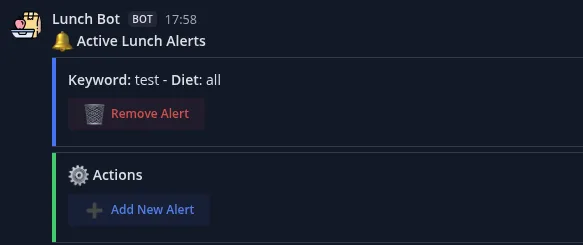
Behind all of this, the typed parameter syntax (/lunch sub [diet] [keyword], /lunch unsub [keyword], /lunch list) still exists and does exactly the same thing as the buttons — but it’s a fallback for anyone who wants it, not something the average person in the channel ever needs to learn.
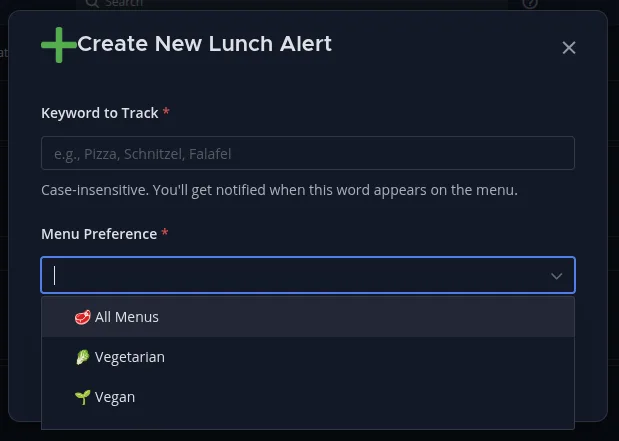
Architecture
The system is built as 8 interlinked n8n workflows in a hub-and-spoke design: one router workflow owns the only entry points Mattermost or a schedule can actually reach (a webhook and a weekday-noon cron trigger), and dispatches to whichever specialized child workflow handles that action — showing the menu, subscribing, unsubscribing, listing alerts, or showing help. The router’s job is to normalize three different shapes of incoming Mattermost payloads (a typed slash command, a button click, or a dialog submission) into a single common format before handing them off.
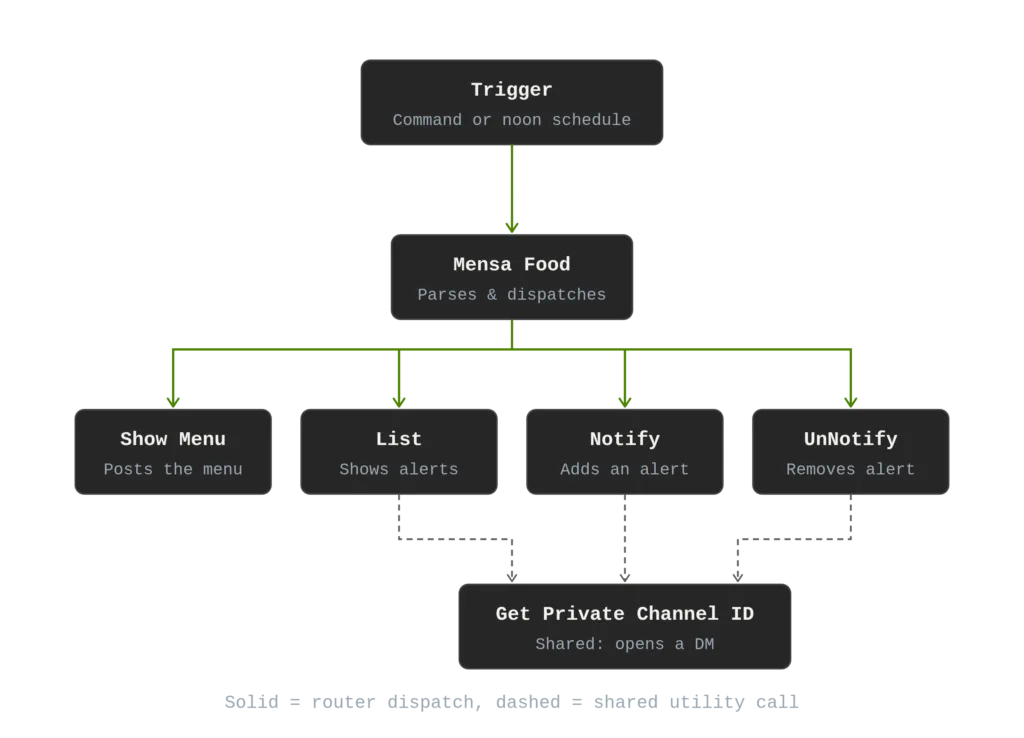
State is deliberately minimal: the only thing that needs to persist is who wants to be notified about what — a single table with three columns (user, keyword, diet preference), stored in n8n’s own built-in Data Table feature rather than standing up a separate database for one small table with no relational needs.
Technical Highlights
A few things worth calling out from actually building this:
Building JSON by hand almost broke the alert list. An early version constructed a Mattermost API request body as a template string, interpolating values directly into it. The moment a menu item or alert keyword contained a character that needed JSON escaping — a quote or a backslash — it produced invalid JSON and silently failed. The real fix wasn’t escaping characters by hand; it was restructuring the workflow to build an actual JavaScript object and let n8n’s own serializer handle the escaping correctly.
Deploying 8 interlinked workflows without manually rewiring anything. Each workflow can call others by reference, and those references cache both an ID and a name. The first version of the deploy script matched workflows by ID, which only works as long as the IDs already match between the repo and the live instance, which breaks the moment you re-import into a fresh n8n instance. The fix was a two-pass algorithm: first resolve every workflow’s real, current ID by name (creating it if missing), then walk every cross-workflow reference and rewrite it to whatever ID that name currently resolves to — so a freshly created workflow’s new ID automatically propagates to everything that calls it, with zero manual re-pointing in the editor.
A quiet correctness bug in the alert matching. Subscribed keywords are stored lowercase, but menu items keep their original capitalization from the source feed — so a case-sensitive match meant the alert system’s core feature silently never fired for ordinary capitalized dish names. Fixed by lowercasing both sides before comparing. A related issue: since alert keywords are arbitrary user input spliced directly into a message, the whole channel sees (the “@mention” pointing out a match), unescaped input could contain markdown control characters or someone else’s @username. Both are now sanitized before ever reaching a shared, public message.
A CI safety net that wasn’t actually watching anything. A GitHub Action was meant to strip cached test-execution data from workflow files before anything could merge — but a path-matching bug meant it was never actually scanning the folder where the real workflow files live, so it was effectively a no-op guarding an empty directory. Once caught, the fix corrected the path matching and added real verification (deliberately reintroducing bad test data locally to confirm the check would now catch it) rather than just trusting that the diff looked right.
Current Limitations
In the interest of not overclaiming: this is tightly built for one specific Mattermost instance and channel — the URLs, channel ID, and diet/food matching logic are hardcoded rather than configurable, so using it elsewhere means editing the workflow files directly, not just changing a config value. A fresh import isn’t fully plug-and-play either: the child workflows need to be imported before the router, and each cross-workflow reference needs to be manually re-pointed during that first import. There’s no automated test suite — correctness is verified manually rather than via repeatable CI tests.