

Project Context
“Ankommen? Migration, Glaube und Identität” (“Arriving? Migration, Faith and Identity”) is a multimedia exhibition that ran from 18 July to 23 October 2025 at the Turm zur Katz in Konstanz, exploring the city’s migration history through the lens of faith, culture, persecution, and new beginnings.
It grew out of an interdisciplinary collaboration between the University of Konstanz, HTWG Konstanz, and HfM Trossingen. Students across Architecture, History, Computer Science, Communication Design, and Music Design developed the multimedia concept during the 2024/25 winter semester; the following semester, around 80 students — with support from faculty and staff — built it out into the finished exhibition.
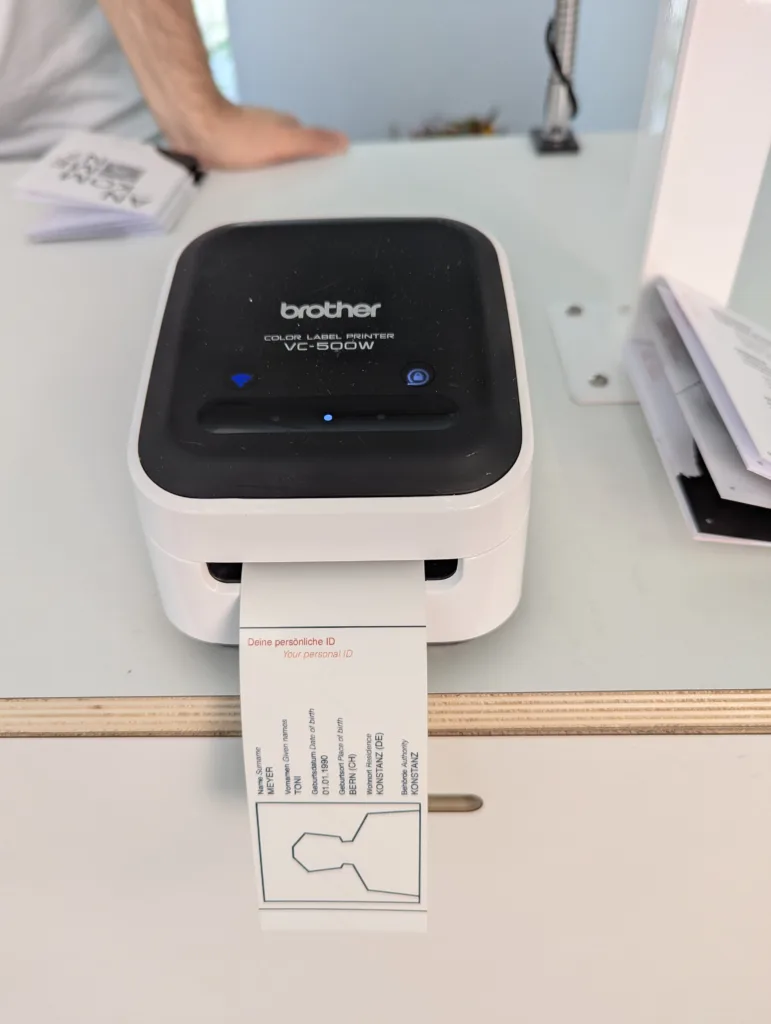
Visitors receive a personal, QR-coded ID at the entrance and carry it through five stations spread across the tower’s floors: a “Meldebehörde” (registration office) entry, six AI-voiced life stories, interactive migration-route maps, VR exploration of religious sites, and reflection points woven through each floor.
The exhibition has since won several international design awards, including Gold at the ADC Talent Award 2026 (Exhibition category), Talent Gold at the DDC Award 2025, Bronze at the CommAwards 2025, and Silver at the European Design Awards 2026.
My Contribution
A note on scope: this page covers my technical/IT contributions to the exhibition — infrastructure, backend, iOS integration, and frontend implementation (including interaction/UX logic). All visual design, illustrations, and graphics were created by other teammates and aren’t part of what’s described here.
My work sat across four areas of the exhibition’s technical backbone: infrastructure, backend, the native iOS kiosk app, and two of the frontend’s visitor-facing stations.
Server & Infrastructure
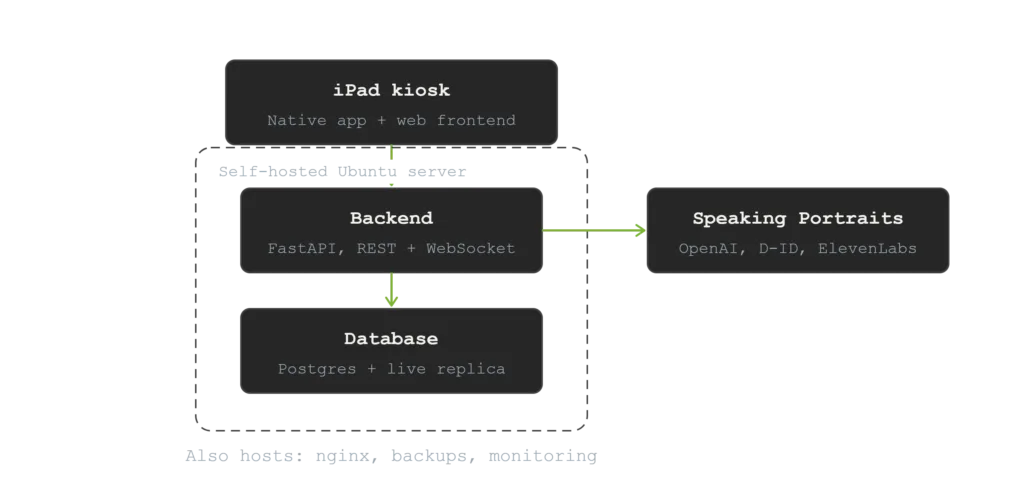
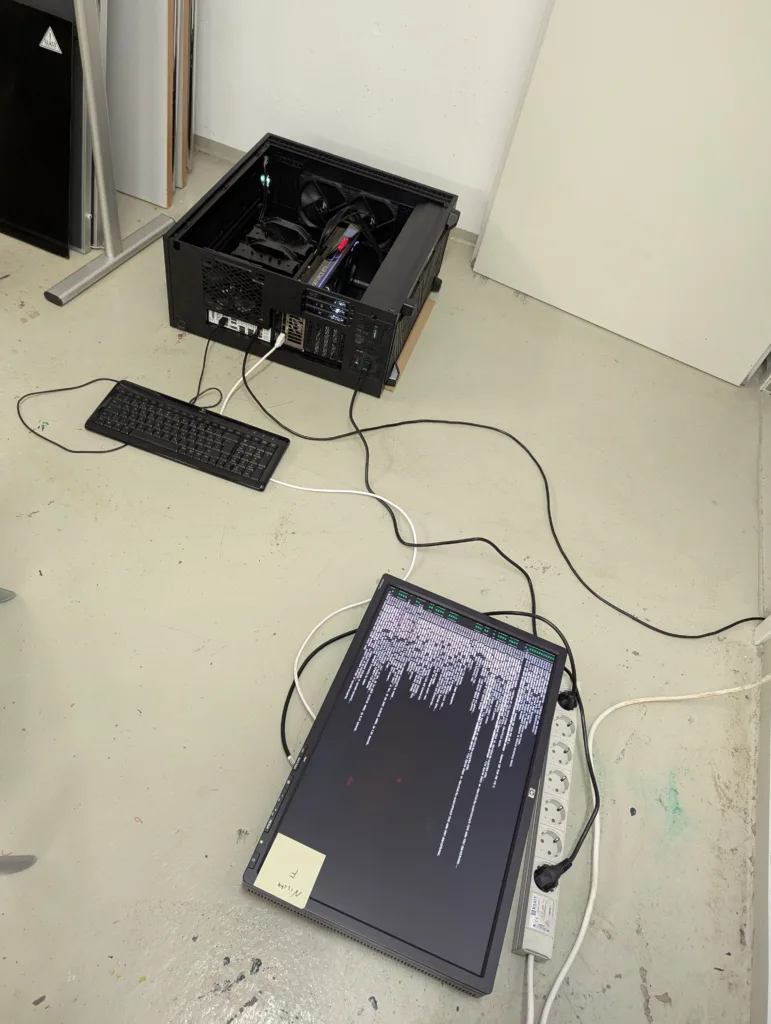
I set up and administered servers for both the backend and the frontend, keeping the entire system running unattended throughout the exhibition’s four-month public run. That meant:
- A live-replicated standby database — Postgres logical replication to a second, physically separate instance, so a hardware failure wouldn’t mean losing months of visitor data.
- Tiered automated backups (hourly, daily, weekly retention) with heartbeat monitoring, plus a health-check script that automatically restarts the backend if it stops responding.
- Wildcard TLS via Let’s Encrypt (Cloudflare DNS-01 challenge) covering every subdomain — backend, frontend, and the ops dashboards (Netdata, Portainer) — from one certificate.
- Full-disk encryption, unlocked via YubiKey hardware keys, as an additional layer of physical security for the server.
- Local DNS for a locally-hosted, still-trusted app — the iPad’s WebView required a real, publicly-trusted TLS certificate (self-signed wouldn’t do), but the network was restricted to local IPs only. Running our own local DNS let the domain resolve straight to its local address while still presenting a genuine Let’s Encrypt certificate.
- The same deployment approach on the frontend: a Docker/nginx setup with its own polling auto-deploy script and uptime monitoring, so both halves of the system can update and recover independently.
Backend
I built the backend’s core alongside my teammate Nader Halwani, who led the exhibition’s AI “speaking portraits” feature—a RAG pipeline that gave six historical/fictional characters their own voices, personas, and document-grounded knowledge. I focused on the core visitor data model and REST API: registration data, the floor-by-floor question/answer system, origin lookups, logging, and the printer-status integration that the physical ID cards depend on.
One piece worth calling out: when a visitor looks up their surname’s historical origin, the results are passed through a profanity filter before being shown — a simple content-safety measure to keep the surname lookup appropriate for a public, walk-up museum kiosk.
iOS Integration
The exhibition’s iPads run a native kiosk app that locks the device into a single full-screen web view and bridges hardware (camera, printer) into it. That native app’s core — the WebView setup, the print bridge, and the QR scanner — was built by Daniel Fink. I contributed several features on top of that foundation: a forced-fullscreen lockdown, a custom app icon, print-status feedback events, an on-site URL override so staff could repoint the app without rebuilding, a device-diagnostics bridge, hidden multi-finger gestures letting staff reset or quit the locked-down kiosk, self-healing reload logic that automatically recovers the WebView, structured remote logging, and a DNS debugging fix.
On the web side, I built the entire iOS bridge layer in the frontend — the TypeScript services that let the Angular app talk to the native shell: triggering the QR scanner, sending print jobs, and reading device diagnostics. One debugging story from this layer: an early version of the print-status feedback misreported failed print jobs as successful, because the completion handler treated a completed: true flag as success even when an error was also present — a one-line logic bug with real consequences for anyone relying on the ID card actually printing.
Frontend: Registration and Reflection
I built the Registration station — the “Meldebehörde” entry flow where visitors enter their name, birthdate, and origin, take a photo, and receive a printed ID — almost entirely on my own. Getting a reliable camera feed here took real trial and error: the station needed the external USB webcam, not the iPad’s own camera, and iOS Safari only reports real camera names once permission has already been granted — so the fix was to trigger a throwaway permission request first, purely to unlock accurate device labels, before doing the real camera selection.
I also built most of the Reflection stations — the question-based touchpoints placed at the end of each floor — with Paul Nitzke contributing the drag-and-drop map question type. Underpinning both stations is a shared screen framework I wrote early on: a base class that every station screen extends, with self-cleaning timers built in to prevent a kiosk running unattended for months from slowly leaking resources across thousands of visitor sessions.
Early on, I also set up the shared ESLint and Prettier configuration enforced across the whole frontend team, wired into a CI pipeline that blocks any push failing lint. On a project with around eight people contributing to one codebase over several months, a single enforced style meant anyone’s code stayed readable and maintainable by everyone else — important on a team project where you can’t always count on the original author being available to explain their code later.